

Claude Duet comes to you before you go to it.
Anthropic opened it on 21 October as a research preview (an early, unfinished release), starting with people on Claude’s paid plans in the US (off a waitlist, for now). Its own page says it “comes to you with what needs your attention, completes tasks you ask of it, keeps working even when you step away, and checks with you before it acts on your behalf.” The reviews so far tell you whether it’s any good. Most of them skip the question that matters if you already run half your working week through Claude.
So this piece looks at one thing: what Claude Duet actually changes for someone who already works in Claude.
WHAT DUET DOES ON ITS OWN
If you already work in Claude, the new part is that Duet works without you there.
Duet runs on its own computer in the cloud, with its own browser, so your laptop can be shut. Every few hours it checks the apps you have connected: Gmail, Slack, your calendar, HubSpot, or any of the thousands of connectors and plugins (the links that let Claude reach other apps) in Claude’s marketplace. Each morning it sends you a short brief on what matters. In between, in Anthropic’s words, it “reads, drafts, and prepares work on its own”.
Then it stops. Before it sends a message, makes a payment, signs a document or deletes anything, it shows you exactly what it’s about to do and waits for your yes. A few things stay off the table even with your yes, such as trading securities or moving money between accounts.
For a Claude user, the interesting part is what comes along for the ride. Anthropic says Duet “carries over your memory, skills, and connected apps from your Claude account” (skills are saved instructions Claude follows for a task), and it can search your past chats so you don’t have to repeat yourself.
FROM ASKING TO APPROVING
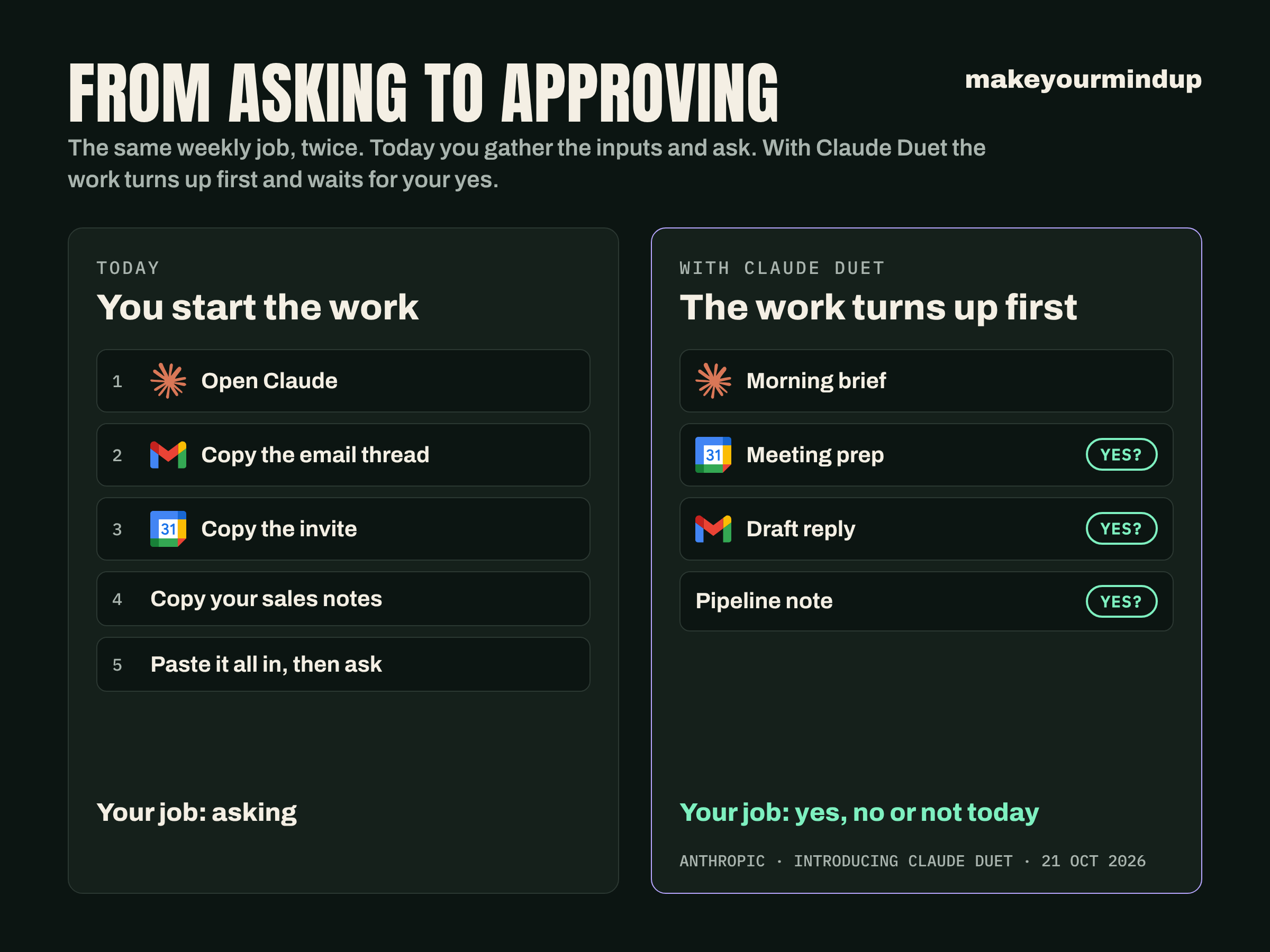
Here’s what neither the launch page nor the reviews say outright. For someone who already lives in Claude, the biggest change Duet makes is who starts the work.
Today you open Claude, paste in the email thread and the calendar invite, add your notes from the sales system, and ask. With Duet, the work turns up first: a brief in the morning, a running list of “what it’s working on and what it needs from me”, as the review in the tech newsletter Every puts it, and drafts waiting for a yes or a no. Your job becomes checking its work and saying yes, no or not today (which, if you manage people, will sound familiar).
A small-business owner on Reddit, u/freakyslug, put it best: “I’m not doing anything that I don’t think a normal version of Claude could do. I just hadn’t thought to use it this way.” They also say they had been falling behind, and caught up in a day and a half.
The catch is habit. A habit only forms around something that keeps coming back, and Claire Vo’s test is the warning. Vo, who hosts the podcast “How I AI”, put Duet to work on an inbox and a sales pipeline, and found that after the first few tasks, nothing “would pull me back in”. Duet earns its place only when you give it a job that comes round every week. One job. Every week.
Step back, and this is bigger than one app. Until now, AI at work has waited to be asked, so it was only as useful as the person who remembered to ask it. Duet is an early example of AI that starts the work itself and brings it to you for a decision. If that becomes normal, a manager’s week tilts the same way. Less of it goes on gathering things up, and more on deciding what goes out. So the skill that matters most becomes judging an answer quickly and well, and teams will need to practise that on purpose.
WHAT COMES WITH YOU AND WHAT STAYS BEHIND
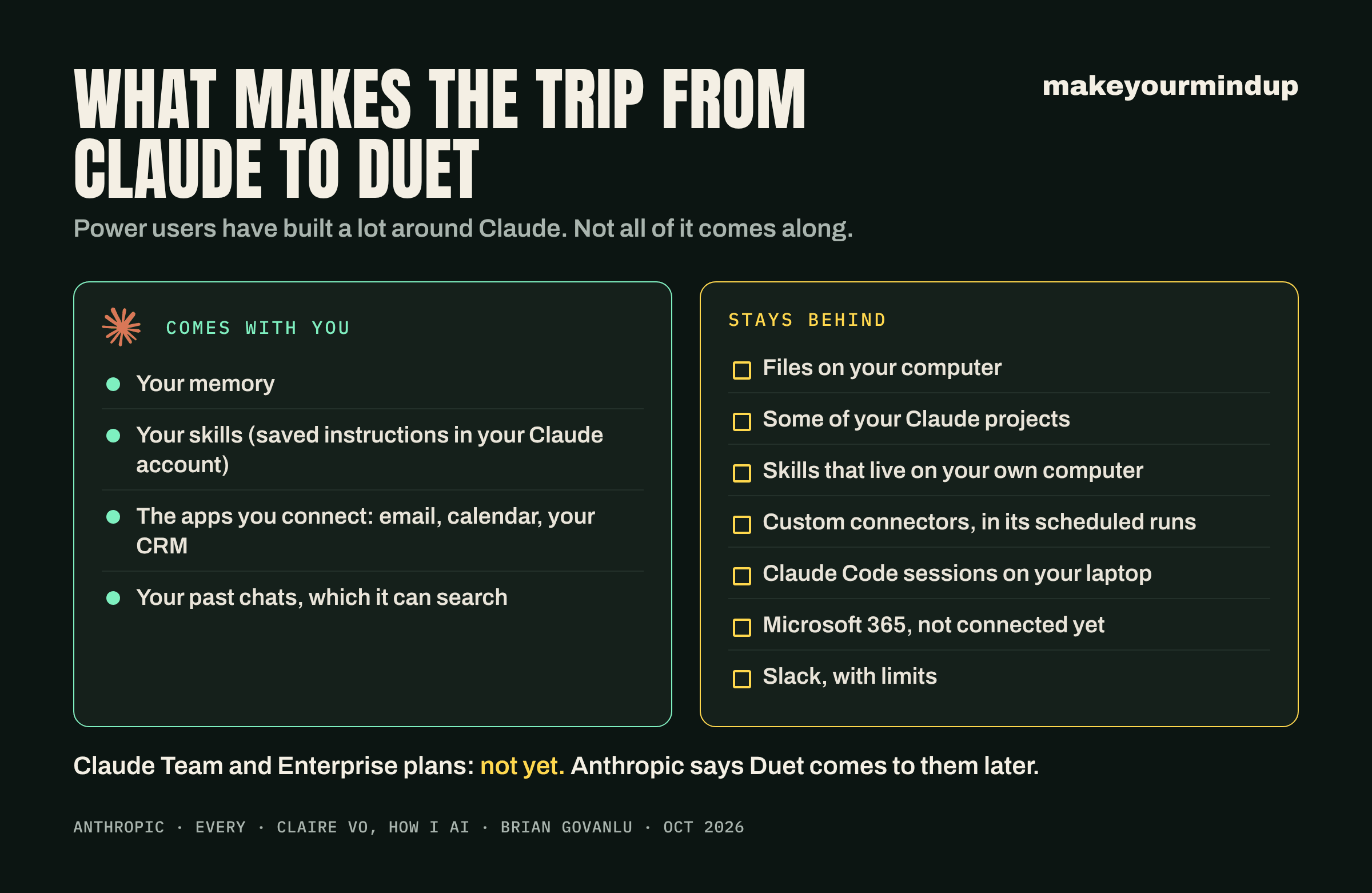
Power users have built a lot around Claude, and not all of it makes the trip.
What comes: your memory, plus whatever is connected to your Claude account. The sales pipeline in Vo’s test is the good example. Duet already had the CRM (the system that tracks customers and deals) and the email to hand, so there was no need “to assemble and paste all the inputs myself”.
What stays behind: files on your computer, and some of your Claude projects. Duet can’t reach either.
Some skills that lived on Vo’s own computer didn’t come across. The reviewer at Every found two more gaps. Duet’s scheduled runs can’t reach custom connectors (links to tools a company built itself). And Duet can see the Claude sessions on the reviewer’s computers but can’t direct them. Brian Govanlu, a Duet user who wrote up the test on LinkedIn, asked it to work with the Claude Code sessions (Anthropic’s tool for writing software) on a laptop; it couldn’t, so Duet filed a feature request with Anthropic instead.
Microsoft 365 isn’t connected yet, and Slack has limits.
And if your company pays for Claude Team or Enterprise, you don’t get it yet. Anthropic says it plans to bring Duet to those plans later. On a Team or Enterprise account, have your first job ready for when it arrives.
WHERE TO HOOK IT IN FIRST
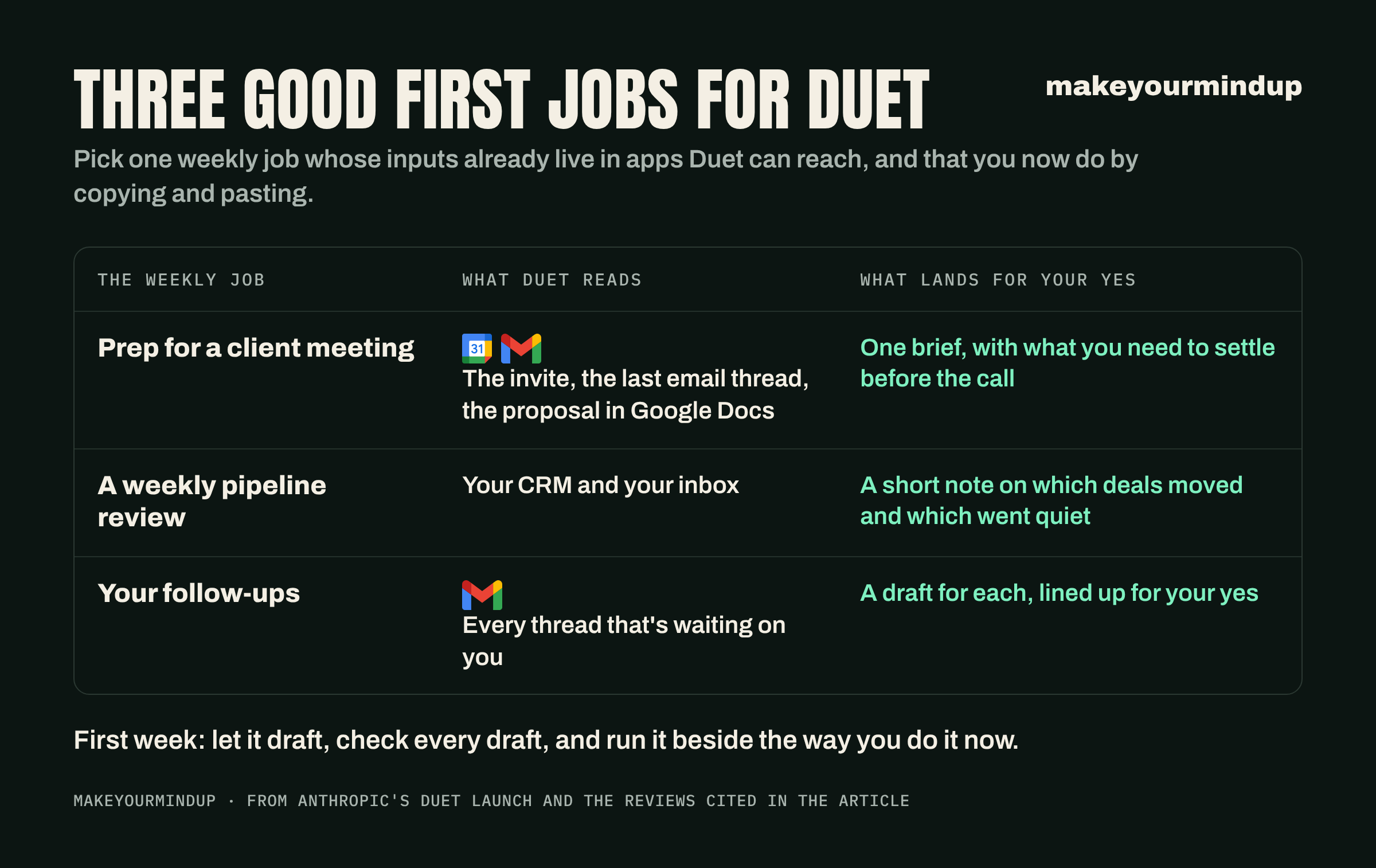
So start with one weekly job whose inputs already live in the apps Duet can reach, and that you now do by copying and pasting into Claude. Three good places to start:
Prep for a client meeting: the calendar invite and the last email thread, with the proposal from Google Docs, pulled into one brief with what you need to settle before the call.
A weekly pipeline review: your CRM and your inbox, turned into a short note on which deals moved and which went quiet.
Your follow-ups: every thread that’s waiting on you gets a draft, lined up for your yes.
For the first week, let it draft. Check every draft before you say yes. Run it beside the way you do it now, and compare what it caught with what it missed. Then look at your usage at the end of the week, because Duet draws on the same usage limit as everything else you do in Claude.
THE JOB WE’D HAND IT FIRST
If you’re wondering what we’d hand it first, it’s the dullest job we have: keeping our Google Drive documents up to date, along with the notes that explain how our systems work. Our other AI tools read those notes before they help us, so when they go stale, every tool works from an old picture of what’s going on. And we only fix that when we remember to. So every week we’d ask Duet to update them from our email and calendar, and show us the changes before it saves them. Every’s review says it can edit docs and “keep them current”. Your version might be the tracker or handover doc your team works from, which is only as good as its last update.
So look for the same job in your own week: the one that only gets done when you remember it, while everything else depends on it. That’s the one to hand over first.
And a quick word to whoever runs IT. People will want to connect work email to a personal plan before your company plan gets Duet. That would put company email in an account the company doesn’t control, so decide your answer now, before they ask.
3 things you can do tomorrow
Write down the one Claude job you do every week by copying and pasting. If its inputs already sit in apps Duet can reach (your email or your CRM, say), that’s your first Duet job.
Check where that job’s inputs live. If any of it sits in files on your computer or behind a custom connector, move it into a connected app, or pick a different first job.
Note how much of your Claude usage limit you use in a normal week now. Then you’ll see what Duet costs you once you’re in.

